
Color Inputs
Three types handle color, ranging from a single swatch to a full multi-token scheme system: Color, ColorScheme, and ColorSchemeGroup.
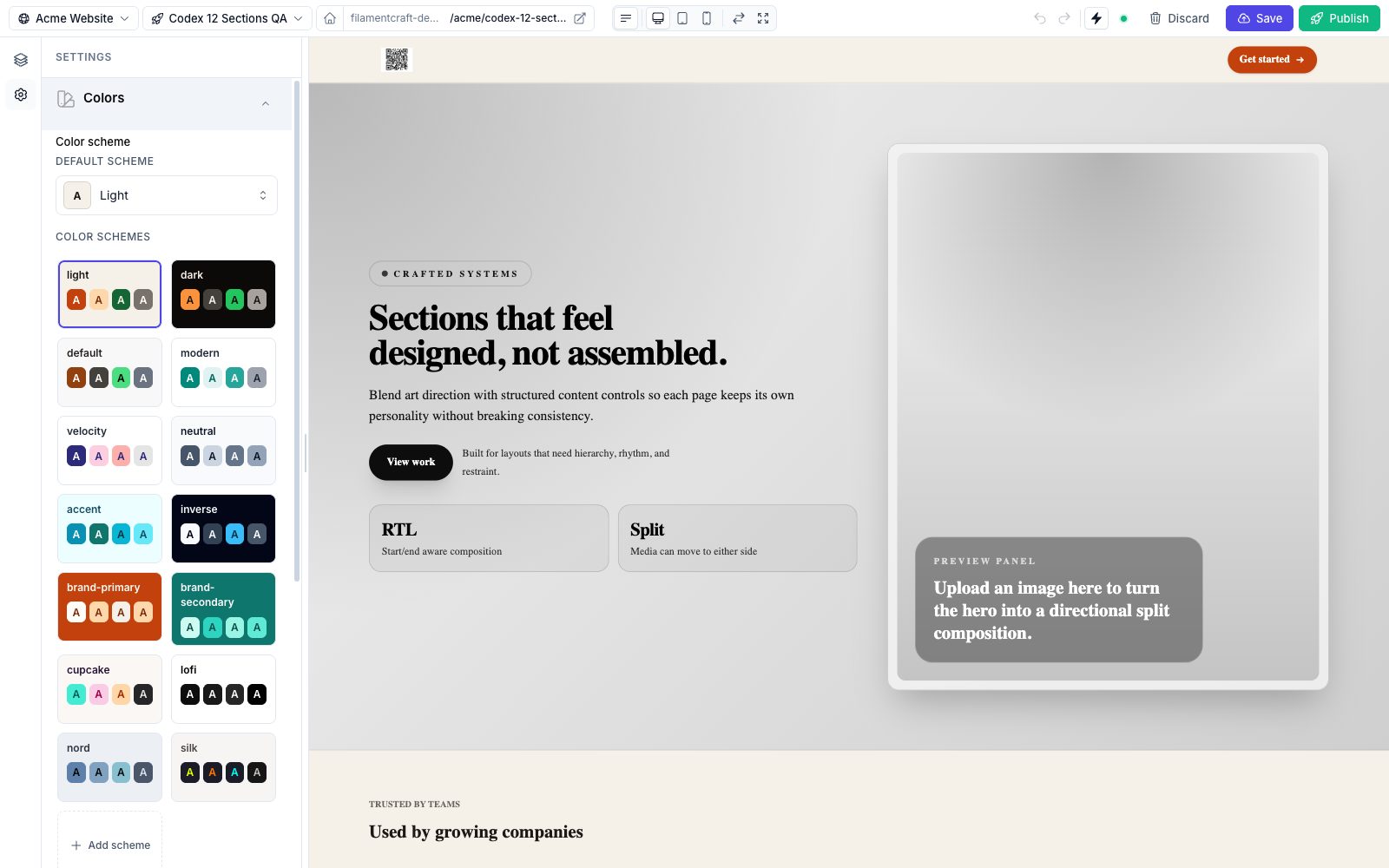
ColorSchemeGroup rendered in the theme panel — a grid of scheme tiles, each a swatch of its 22 tokens, plus an "Add scheme" affordance.Color
A single color picker, compiled to a Filament ColorPicker. Stores a hex string. Uses the lazy live(onBlur: true) update mode.
use FilamentCraft\Settings\Types\Color;

Color::make('accent')
    ->label('Accent color')
    ->allowAlpha()
    ->cssVar('--accent')
->default('#f59e0b');| Method | Effect |
|---|---|
allowAlpha(bool $value = true) | Allow an alpha channel (RGBA), not just opaque hex. |
Reach for Color when you need one ad-hoc color. For a coordinated palette that sections can reference semantically (bg-primary, text-on-surface), use a color scheme instead.
ColorScheme
A scheme picker, compiled to FilamentCraft's ColorSchemePicker. It lets the editor choose which color scheme a section (or block) renders with — the schemes themselves are defined by ColorSchemeGroup (below) or shipped as built-ins. Uses the instant live() update mode.
use FilamentCraft\Settings\Types\ColorScheme;

ColorScheme::make('scheme')
    ->label('Color scheme')
->inheritable();| Method | Effect |
|---|---|
inheritable(bool $value = true) | Allow an "inherit" option so the section falls back to the page/theme scheme. |
Every built-in section exposes a ColorScheme::make('scheme') control. In the Blade view the selected scheme is applied with:
<div {!! $section->colorScheme()->attributes() !!} class="bg-background text-on-background">
  …
</div>
ColorSchemeGroup
The full scheme manager, compiled to FilamentCraft's ColorSchemeGroupField. This is a theme-level control: it renders a grid of scheme tiles plus an "Add scheme" affordance, and drilling into a tile opens the 22-token editor.
use FilamentCraft\Settings\Types\ColorSchemeGroup;

ColorSchemeGroup::make('color_scheme')->default('light');
ColorSchemeGroup takes no extra configuration beyond the shared methods — its behaviour (token set, built-in schemes, OkLch shade generation) is fixed.
The 22 tokens per scheme are: Background, On Background, Surface, On Surface, Surface Alt, On Surface-Alt, Primary, On Primary, Secondary, On Secondary, Accent, On Accent, Neutral, On Neutral, Info, On Info, Success, On Success, Warning, On Warning, Danger, On Danger.
For the full scheme system — the 14 shipped schemes, auto-generated OkLch shades, per-site persistence, and the Tailwind @theme mapping — see the dedicated Color Schemes page.