
Media & Content Inputs
Four types handle media and rich content: Image, Icon, Link, and RichText. These store structured values you read in your section Blade, rather than CSS tokens.
Image
A file upload, compiled to a Filament FileUpload()->image() with the built-in image editor. Uses the lazy live(onBlur: true) update mode.
use FilamentCraft\Settings\Types\Image;

Image::make('bg_image')
    ->label('Background image')
    ->disk('public')
    ->directory('sections')
    ->visibility('public')
    ->accept(['image/png', 'image/jpeg', 'image/webp'])
    ->maxSize(4096)
    ->editor()
    ->aspectRatios([null, '16:9', '4:3', '1:1'])
    ->editorMode(2)
->editorEmptyFillColor('#000000');| Method | Effect |
|---|---|
disk(string $disk) | Storage disk. Defaults to the package upload config. |
directory(string $directory) | Upload sub-directory. |
visibility(string $visibility) | public or private. |
accept(array $accept) | Allowed MIME types. |
maxSize(int $kilobytes) | Max upload size in KB (falls back to filamentcraft.uploads.max_size_kb, default 5120). |
editor(bool $editor = true) | Enable Filament's in-browser image editor. |
aspectRatios(array $ratios) | Crop ratios offered in the editor (default [null, '16:9', '4:3', '1:1']). |
editorMode(int $mode) | Filament image-editor mode (default 2). |
editorEmptyFillColor(string $color) | Fill color for transparent areas (default #000000). |
For how stored image values resolve to URLs and resized variants at render time, see Image Uploads & Variants.
Icon
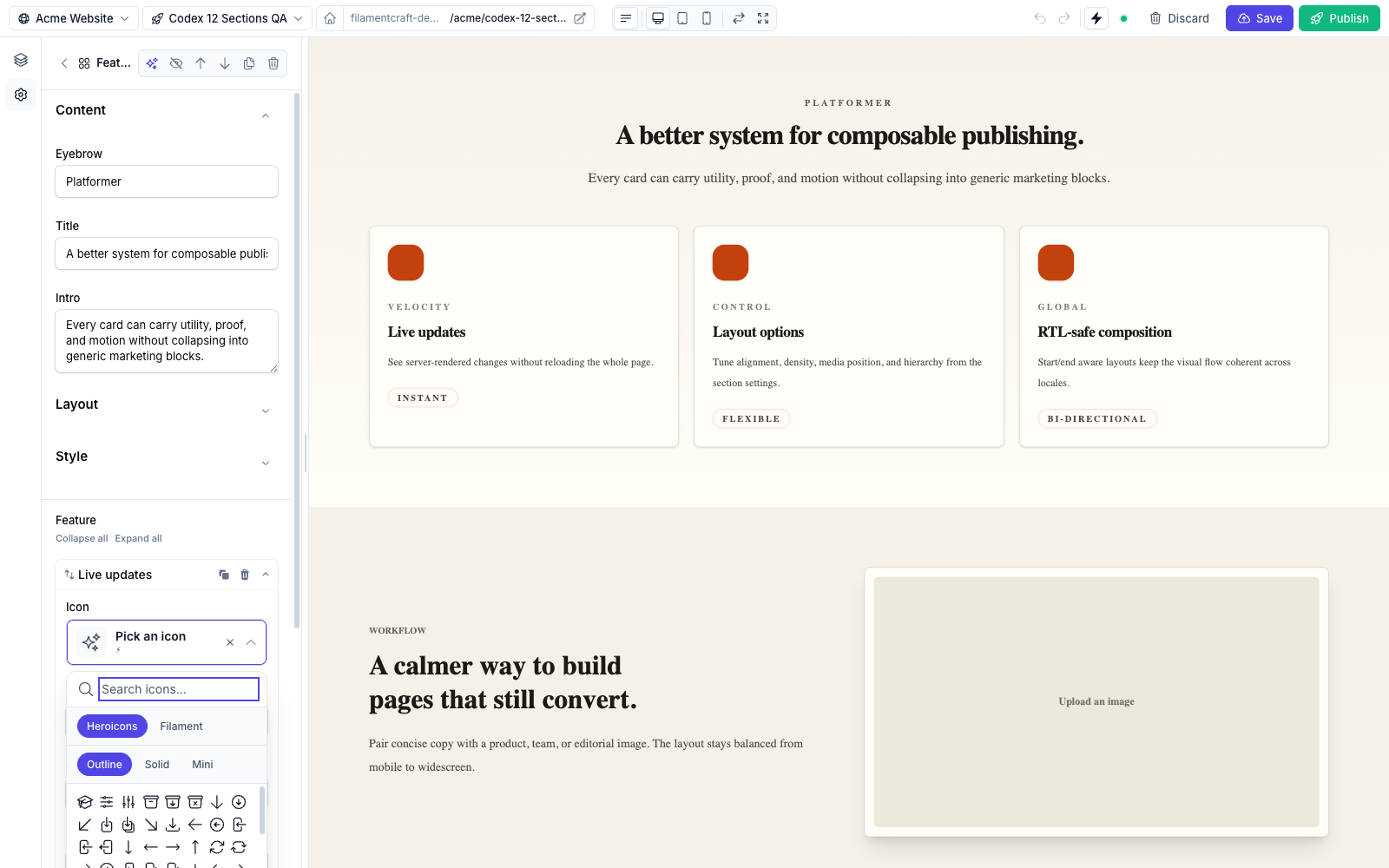
Icon picker — searchable, with Heroicons / Filament sets and Outline / Solid / Mini variants.An icon picker, compiled to FilamentCraft's IconPicker. Uses the instant live() update mode. Defaults to the Heroicons set.
use FilamentCraft\Settings\Types\Icon;

Icon::make('icon')
    ->label('Icon')
->set('heroicons');| Method | Effect |
|---|---|
set(string $set) | Restrict to a specific icon set. '' or 'heroicons' uses the default; any other value scopes the picker to that registered set. |
See Icons for registering additional sets.
Link
A URL input, compiled to a TextInput()->url(). Uses the lazy live(onBlur: true) update mode. It takes no extra configuration beyond the shared methods.
use FilamentCraft\Settings\Types\Link;

Link::make('cta_url')
    ->label('Button link')
    ->default('/start');
Template-aware links
For CTAs that should point at one of your published FilamentCraft pages, the Hero section uses TemplateUrlPicker — a Select subclass that searches published templates and stores their resolved public URL. It's a raw Filament component, droppable into any section schema.
Rich text
A WYSIWYG editor, compiled to Filament's RichEditor (TipTap/ProseMirror). The editor stores Filament's rich-content document state; when you read the setting in a section, FilamentCraft transforms it into a RichTextValue whose string form is rendered HTML.
use FilamentCraft\Settings\Types\RichText;

RichText::make('body')
    ->label('Body')
->inline();| Method | Effect |
|---|---|
inline(bool $value = true) | Inline editing mode. |
RichText is forced into the lazy live(onBlur: true) mode for a reason: the TipTap bubble menu throws if Livewire morphs the surrounding DOM mid-keystroke, so the preview round-trip is deferred until you click away. You don't configure this — it's automatic.